
Exposure Value Calculator
Enter an aperture, shutter speed and ISO to find the exposure value (EV), then see equivalent settings that give the same exposure — faster shutter, wider aperture or a different ISO. A table of typical scene EVs helps you estimate exposure without a meter.
- Free to use
- No sign-up
- Runs in your browser
Calculate exposure value
Exposure Cheat Sheet Pack
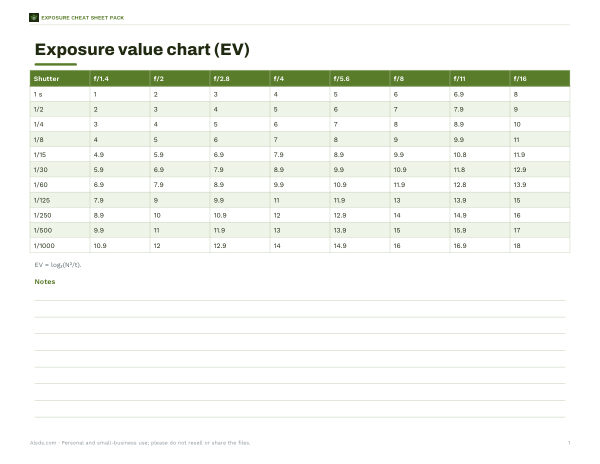
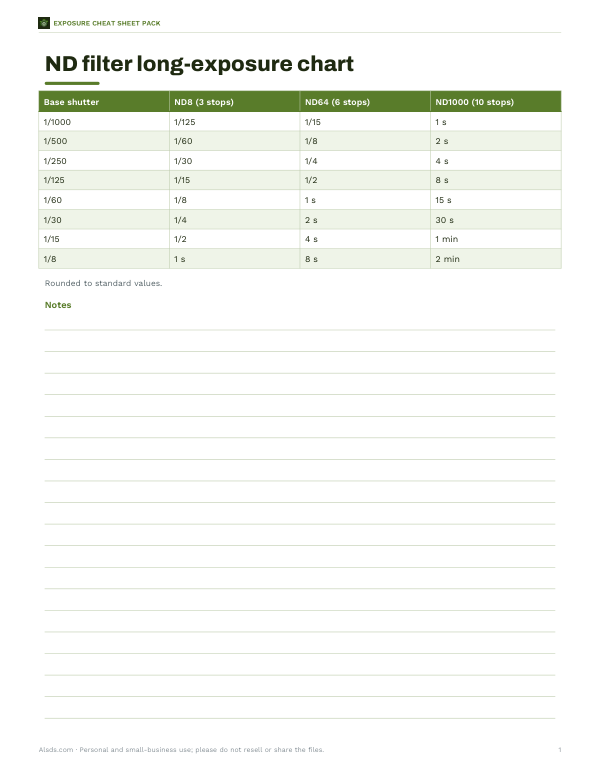
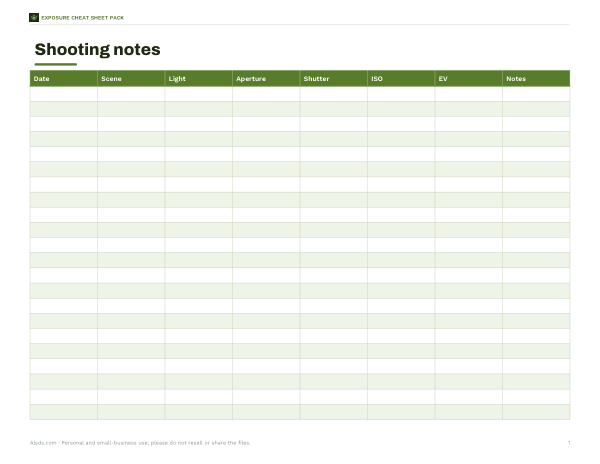
Printable exposure charts: EV tables, Sunny 16 variants, ND filter conversion and a shooting notes log.
- EV chart for aperture & shutter (PDF, XLSX)
- ND filter conversion (PDF, XLSX)
- Shooting notes log (PDF, DOCX)
Formats: PDF, XLSX, DOCX. Instant download after payment (link valid 72 hours, up to 5 downloads). AI-assisted: the templates were drafted with AI help and reviewed and laid out before publishing.
$3.00 USD, one-time 3 files · about $1.00 each
- Instant download
- 7-day refund
- Secure checkout by Stripe
7-day money-back guarantee. Full refund within 7 days of purchase, even after you download.
Full refund within 7 days — see the refund policy and license.
Free printables
Single sheets you can print right now, no sign-up. The full pack adds every sheet in one download plus the editable files.
What exposure value means
Exposure value (EV) is a single number that describes combinations of aperture and shutter speed that let in the same amount of light. It was introduced so that photographers could lock exposure and shift between settings without changing the result. Formally, EV = log₂(N² ÷ t), where N is the f-number and t the shutter time in seconds. f/1 at 1 second is EV 0; f/8 at 1/125 is about EV 13. Every increase of 1 EV means half as much light reaches the sensor — one stop less exposure.
EV and ISO
The same formula can describe scene brightness when it is tied to a sensitivity. Light meters and charts usually quote EV at ISO 100: the settings that correctly expose a scene at ISO 100. If you raise ISO, you need less light, so the camera settings give a higher EV for the same scene: at ISO 400 you can use settings two EV higher (two stops less light) than at ISO 100. The calculator reports both the EV of your settings and the equivalent scene brightness at ISO 100.
Typical scene EV values (ISO 100)
| Scene | Approximate EV₁₀₀ |
|---|---|
| Bright sun on snow or sand | 16 |
| Bright sun, distinct shadows | 15 |
| Hazy sun, soft shadows | 14 |
| Cloudy bright | 13 |
| Heavy overcast, open shade | 12 |
| Sunset, just after | 11–12 |
| Bright office or classroom | 8–9 |
| Home interior, evening | 5–7 |
| Brightly lit night street | 7–8 |
| Floodlit buildings | 3–5 |
| Landscape under full moon | about −3 |
The “Sunny 16” rule follows from this: in bright sun, set f/16 and a shutter speed close to 1/ISO. At ISO 100 that is f/16 at 1/100 or 1/125 — about EV 15.
Equivalent exposures
Because EV counts stops, you can trade shutter speed for aperture one stop at a time without changing exposure: f/8 at 1/125, f/5.6 at 1/250 and f/11 at 1/60 are all EV 13. Use this to choose what matters for the photo — a fast shutter to freeze motion, a wide aperture for background blur, or a small aperture for depth of field — while keeping the brightness the same. The calculator lists equivalents across the full-stop aperture scale.
Worked example
Your meter suggests f/8 at 1/125 at ISO 100 on an overcast day: EV 12.97, about EV 13. You want a blurred background for a portrait, so you open to f/2.8 — three stops wider. To keep the same exposure you shorten the shutter three stops to 1/1000. If you later move to ISO 400 indoors where the scene is EV 7 at ISO 100, the settings at ISO 400 correspond to EV 9 — for example f/2.8 at 1/60.
Stops, thirds and camera dials
Modern cameras usually adjust in third-stop increments: 1/125, 1/160, 1/200, 1/250, and f/5.6, f/6.3, f/7.1, f/8. The calculator works with any value, so you can enter third-stop settings to see fractional EVs. Remember that f-numbers change by a factor of about 1.4 (the square root of 2) per stop because the light gathered depends on the area of the aperture.
Using EV in practice
- Exposure compensation is expressed in EV: +1 EV brightens by one stop, −1 EV darkens by one stop.
- Bracketing takes shots at, for example, −1, 0 and +1 EV for HDR or safety.
- Neutral density filters are rated in stops (ND8 = 3 stops): subtract that from the scene EV to find long-exposure settings.
- Flash and lighting ratios are often discussed in stops of difference between light sources.
EV and light meter readings
Handheld light meters often display EV directly, and many camera specifications quote their metering range and autofocus sensitivity in EV — for example, autofocus “down to −4 EV” means the system can still focus in extremely dim light equivalent to a moonlit scene. Reading EV lets you compare equipment and conditions across different aperture and shutter combinations. When a meter reports EV 12 at ISO 100, you can pick any pair from the equivalents list for that value, and adjust by one EV for every doubling or halving of ISO.
Metering modes and tricky scenes
A camera meter aims to render whatever it measures as a mid-tone. That works for average scenes but misleads in extremes: snow and white sand come out grey unless you add +1 to +2 EV of compensation, and a dark subject against a black background can be overexposed unless you subtract. Spot metering reads a small area, letting you meter a face or a mid-tone deliberately; centre-weighted and matrix (evaluative) modes average larger areas. Checking the histogram after a test shot is the quickest way to confirm the exposure value you chose was right.
Frequently asked questions
What is EV 0?
f/1 at 1 second — the reference point of the scale. At ISO 100 it corresponds to a very dim scene.
What EV is a sunny day?
Around EV 15 at ISO 100; bright snow or sand about EV 16.
How does ISO change EV?
Doubling ISO lets you use settings one EV higher for the same scene.
Is EV the same as exposure compensation?
Compensation is measured in EV steps, but it is an adjustment relative to the meter's suggestion, not an absolute value.
What is the formula for EV?
EV = log₂(N² ÷ t), with N the f-number and t the shutter time in seconds.
Does EV include ND filters?
An ND filter reduces light by its rating in stops; subtract those stops from the scene EV.